 Excel → ASYCUDA XML Converter
Turn Your Excel Manifests into ASYCUDA XML in Seconds
No more manual data entry or complex XML editing. Upload your Excel file, map your fields, and get a ready-to-submit ASYCUDA XML file — fully online, no install required.
delivered in seconds
From Excel to ASYCUDA XML in 3 Steps
No technical knowledge required. Get your first conversion done in minutes.
Upload Your Excel File
Upload your existing Excel manifest — our tool accepts standard spreadsheet formats, including large files.
Map Your Fields
Use the intuitive interface to match your column headers to the required ASYCUDA fields. Save your config for reuse.
Download Your XML
Preview your generated ASYCUDA XML in full, then download your ready-to-submit file instantly.
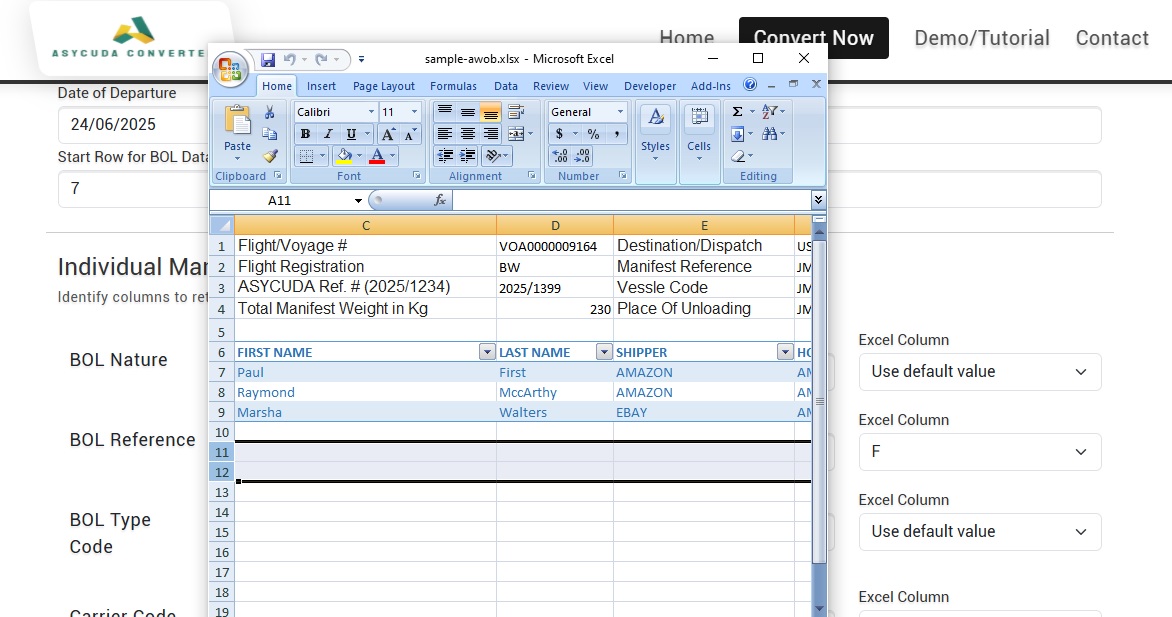
Match Your Excel Columns to ASYCUDA Fields Instantly
Our guided field mapper lets you link your existing Excel headers to the required ASYCUDA XML structure — no XML knowledge or coding needed.
- ✓ Intuitive column-matching interface
- ✓ Save your configuration for repeated use
- ✓ Handles large Excel files with hundreds of records
- ✓ Automatic validation before export
- ✓ Supports AWOB (Air Waybill / Bill of Lading) manifests
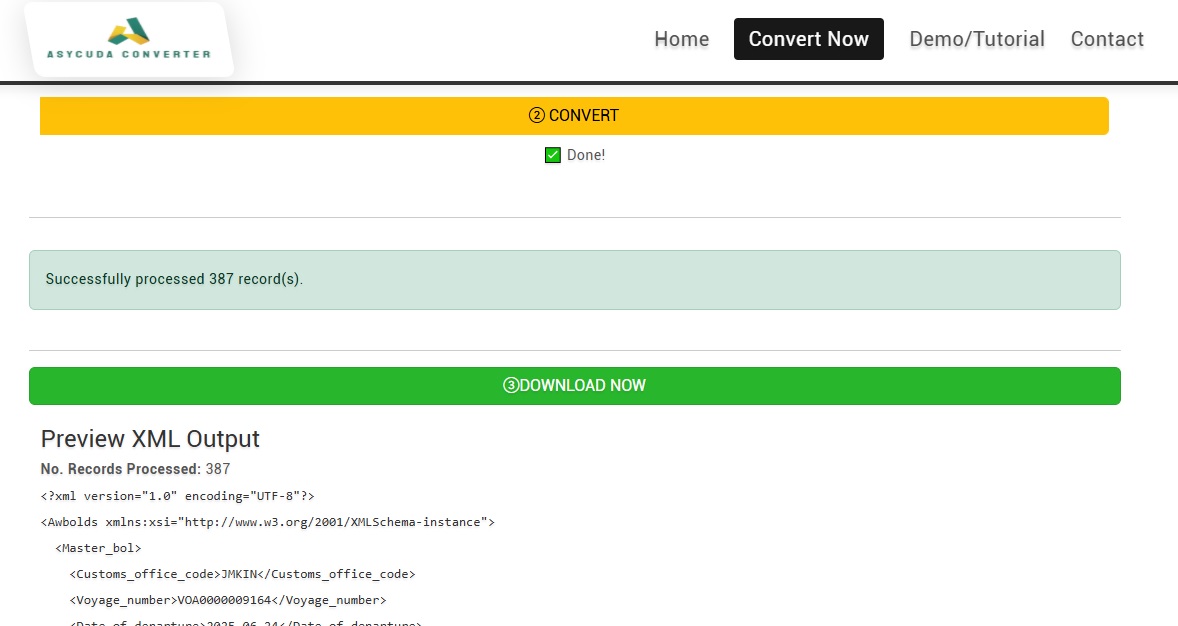
Review Your XML Output Before You Submit
Before downloading, review a full sample preview of your generated ASYCUDA XML — verify accuracy and catch any issues before submission.
- ✓ Full XML preview with detailed output
- ✓ Automatic pricing based on record count
- ✓ Secure file storage with unique download link
- ✓ Compliant, ready-to-submit ASYCUDA format
Built for Real Customs Workflows
Every feature is designed around the daily needs of freight and logistics professionals.
Instant Conversion
Convert Excel manifests to AWOB XML in seconds — no waiting, no delays, no complexity.
Fully Online
Works directly in your browser. No software to install, no updates to manage, works on any device.
Preview Before Download
Check a detailed sample of your generated XML output before committing to the final download.
Secure Storage
Files are stored securely with a unique download link — private, protected, and accessible only to you.
Saved Configuration
Save your field mapping once, reuse it forever. Perfect for high-volume ongoing processing.
Handles Large Files
Designed for real workloads — process Excel manifests with hundreds of records without issues.
Video Tutorial Included
A full onboarding walkthrough gets you up and running immediately — no guesswork required.
Transparent Pricing
Cost is automatically calculated based on your number of records — clear, fair, and upfront.
Free Setup Consultation
Your first 1-on-1 guided session is completely free — we set you up and get your first XML done.
Perfect For Customs & Logistics Professionals
Wherever you are in the supply chain, the Asycuda Converter simplifies your documentation.
Freight Forwarders
Customs Brokers
Shipping Agents
Logistics Professionals
ASYCUDA Market Traders
Watch the Full Walkthrough
From Excel upload to ASYCUDA XML download — see the entire process in one quick demo.
Trusted by Customs Professionals
Real results from professionals who’ve streamlined their customs documentation workflow.
“This tool saved us hours of manual work every week. The process is so simple!”
“Highly recommend! It turned complicated XML requirements into a 2-minute task.”
“The sample preview is great, and the video tutorial helped us get started right away.”
Get Set Up the Right Way — Fast FREE
Struggling to configure your Excel file for ASYCUDA XML conversion? Our Getting Started Consultation is designed to take you from confusion to completion in one guided session.
- We review your Excel file together and identify any issues
- Help you map your fields correctly to ASYCUDA requirements
- Configure your first conversion setup from scratch
- Generate your first ASYCUDA XML file live during the call
- Show you how to reuse your saved configuration going forward
- Answer all your questions about the tool and the process
🔒 Requirements: Your Excel file (if available — we can help you create one) & a stable internet connection.
Your first session is 100% free. Additional follow-up sessions available anytime.
📅 Book Your Free Session
Pick a time that works for you. Bring your Excel file — we’ll handle the rest.
Or Book directly on our website:
📅 Book Free Consultation Now →Say Goodbye to Manual XML Preparation
Join freight forwarders, customs brokers, and shipping agents who’ve eliminated hours of manual work with the Asycuda Converter.